
What Is In-Store Digital Signage? Definition, Use Cases, and Best Practices
Digital signage makes it possible to display content on screens at the point of sale. When used well, it helps inform, guide, promote, and animate the customer journey. When poorly planned, it quickly becomes one more screen that no one really looks at.
In-store digital signage refers to all content displayed on screens installed in a store: entrance screens, aisle screens, checkout screens, kiosks, totems, or screens in waiting areas. Its purpose is easy to state, but harder to get right: display the right message, in the right place, at the right time.
In many stores, screens have been introduced gradually. One screen to announce promotions at the entrance, another to bring an aisle to life, sometimes a totem to present services, seasonal content, or commercial operations. The challenge begins when these screens are no longer managed as a real communication material, but as a sequence of files to upload somewhere.
An effective setup is not just about “putting a video on a screen.” It requires editorial logic, readable content, clear organization, and consistency with other in-store materials: printed posters, POS materials, in-store signage, store network messages, commercial campaigns, and practical information.
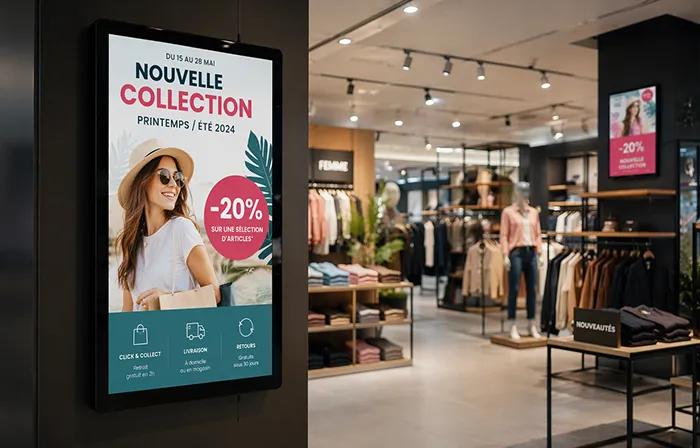
Clear definition
In-store digital signage: what exactly are we talking about?
In-store digital signage consists of displaying visual content, animated or static, on screens located at a point of sale. This content can be informational, promotional, service-oriented, event-based, or related to an in-store campaign.
Unlike a printed poster, a screen can rotate several messages, include motion, be updated faster, and vary by time of day, operation, or store zone. That flexibility is its main advantage, but also its biggest trap: because it is easy to display more content, it is easy to display too much.
What it is
A digital communication material for the point of sale, designed to display short, visible messages adapted to the store context.
What it is not
A simple TV placed in an aisle, a video loop with no objective, or a space where every available campaign gets stacked together.
So the right question is not just: “What can we display?” It is rather: “Which message truly helps the customer or the store in this exact location?”
What is digital signage used for in a point of sale?
In a store, digital signage can serve several purposes. Some are very commercial, while others are more practical. The best systems often combine both, without losing sight of the readability of the customer journey.
Highlight an offer
A screen can support a promotion, a seasonal operation, a new product, or a key commercial moment.
Guide the customer
It can point customers to a service, a zone, an aisle, a kiosk, a checkout area, or useful information along the journey.
Animate a space
In an entrance, aisle, or waiting area, a screen can add rhythm and make an operation more visible.
Relay store network communication
For a multi-site retail brand, it makes it possible to display consistent messages across several stores.
This medium is especially useful when messages need to change often: short-term promotions, local offers, national campaigns, seasonal messages, store updates, or playlists adapted to specific periods.
Field examples
Where should screens be placed and what content should they display?
A screen does not serve the same purpose depending on where it is placed. At the entrance, it can capture attention and set the tone for a key moment. In an aisle, it needs to stay precise and directly connected to the purchase. At checkout or in a waiting area, it can display more service-oriented or inspirational messages.
| Location | Main goal | Suitable content |
|---|---|---|
| Store entrance | Give visibility to a key moment. | Commercial operation, major offer, event, welcome message. |
| Aisle or product universe | Support decision-making or showcase a range. | New product, usage tip, product benefit, themed selection. |
| Waiting area or checkout | Inform without overloading the journey. | Services, loyalty program, practical reminder, short inspiration. |
| Kiosk or totem | Make information accessible or interactive. | Catalog, product search, customization, wayfinding, customer service. |
Before building a playlist, start with the display zone. An aisle screen does not need the same level of information as an entrance screen. Context should guide the content, not the other way around.
What makes the difference between a useful screen and an ignored screen
A screen can be technically well installed and still be ineffective. In store, customers do not watch screens the way they watch a video on their phone. They walk, compare, look for a product, watch their cart, talk to a sales associate, or follow a child. The content needs to be understood very quickly.
A loop that is too long, cluttered visuals, hard-to-read text, messages that change too quickly, or content with no connection to the store zone.
A short message, a visual readable from a distance, a clear objective, strong hierarchy, and consistency with other in-store communication materials.
Motion catches the eye, but it does not replace clarity. A restrained animation, a readable price, a direct headline, or a well-chosen product image can be more effective than a highly animated piece of content that is too dense.
Implementation
How can you structure an in-store digital signage system?
To keep digital signage from becoming case-by-case file management, it helps to establish a simple method. This improves consistency, especially when several stores, departments, or campaigns are involved.
Define the role of each screen
A screen needs a function: inform, promote, guide, inspire, or support a waiting moment. Without a clear role, it quickly becomes a catch-all medium.
Plan suitable formats
A visual designed for a printed poster, a catalog, or a web post is not always readable on screen. Dimensions, text density, duration, and visual hierarchy need to be adapted.
Organize playlists
The playlist needs to balance commercial content, practical information, brand messages, and any partner brand messaging.
Define who approves and who broadcasts
In a store network, the question is not only creative. You need to know who prepares content, who can adapt it, who approves it, and who decides when it goes live.
Best practices for readable screen content
Readability is one of the most important aspects of digital signage at the point of sale. A screen can be bright, well placed, and high quality, but if the message is too long or poorly structured, it will not be remembered.
- Limit the text. The customer should understand the main idea in just a few seconds.
- Work on hierarchy. A headline, a key piece of information, a strong visual: the screen should not give everything the same weight.
- Adapt content to viewing distance. A screen seen from far away requires shorter text and stronger contrast.
- Avoid overly long loops. If the important message appears too rarely, it may never be seen.
- Maintain brand consistency. The screen should fit into the retail brand’s world, not create a constant visual break.
This consistency is especially important when digital signage coexists with printed materials. Customers do not always distinguish between the internal organization of communication materials. They see a store, a brand, and a promise. Screens, posters, and signage should therefore tell the same story.
Common mistakes with in-store digital signage
Mistakes do not always come from the technology. They often come from a lack of editorial or operational framing. The screen works, but the message is not suited to the reality of the point of sale.
Reusing visuals without adapting them
A catalog visual, printed poster, or web banner can lose readability on screen. The dynamic format often requires a dedicated version.
Displaying too many messages in the same loop
The longer the playlist gets, the less likely each message is to be seen at the right moment. Quantity ends up reducing impact.
Forgetting store teams
If content does not match the operations actually in place, stock levels, prices, or local priorities, the screen can create confusion instead of helping.
What Toucan® brings to in-store digital signage
When the number of screens grows, the topic becomes less technical and more organizational. The right content needs to be created, adapted when needed, broadcast in the right playlists, and kept consistent across stores.
Toucan® helps retail brands manage this continuity between printed materials and screens. The software lets teams create posters from interactive catalogs or product databases, design visuals through an integrated module, then broadcast playlists on in-store screens.
A simple example
A commercial operation begins across the whole store network. Headquarters prepares the key messages, stores receive consistent materials, and screens relay content in the relevant zones. The goal is not only to move faster: it is to reduce gaps between what was planned, what is displayed, and what the customer actually sees.
In this context, digital signage becomes part of a broader in-store communication system, not an isolated channel that is managed separately.
Digital signage should remain focused on the customer journey
In-store digital signage is useful when it brings clarity, visibility, or animation. It loses value when it becomes a flow of messages that are too numerous, too generic, or too disconnected from the shopping situation.
Success depends on balance: well-placed screens, content designed to be understood quickly, controlled playlists, and solid coordination between headquarters, stores, and the teams that produce the materials.
A good screen does not simply try to capture attention. It helps the store communicate better, at the moment when the customer can actually understand and use the message.
Organize your in-store screen content more effectively
Toucan® helps retail brands create, adapt, and broadcast their in-store content, from printed posters to screen playlists. A simpler way to keep messages consistent, readable, and suited to the realities of the point of sale.
Explore Toucan®FAQ - In-store digital signage
In-store digital signage consists of displaying content on screens installed at the point of sale to inform, promote, guide, or animate the customer journey.
The most common use cases include offer highlights, commercial animation, customer information, service promotion, in-store guidance, and store network campaign relays.
The most relevant locations include the entrance, aisles, waiting areas, checkout zones, corners, service counters, or spaces where the customer needs useful information.
Effective content should be short, readable from a distance, visually structured, adapted to the display zone, and consistent with the store’s other communication materials.
Yes. Toucan® lets teams create visuals, organize content, and broadcast playlists on in-store screens while maintaining consistency with printed materials.