
Digital Signage Automation: Why It Is Becoming Essential in 2026
In-store screens can no longer be managed as simple media to fill at the last minute. In 2026, digital signage automation is becoming a key lever for displaying the right content, in the right place, without adding extra work for teams.
Digital signage automation addresses a very concrete challenge for store networks: content changes quickly, campaigns are multiplying, field teams lack time and screens need to stay useful, consistent and up to date.
For a long time, digital signage was mostly seen as a modern communication channel: a screen in the window, a screen at checkout, a playlist displayed in-store. But as soon as a network grows, commercial operations follow one another, or messages need to be adapted by store, manual management quickly shows its limits.
Digital signage automation means preparing, scheduling, adapting and displaying screen content with as few manual steps as possible.
It is becoming essential in 2026 because retail brands need to become more responsive, limit display errors, harmonize communication across their network and ease the workload on store teams. The challenge is not only technical: it is organizational.
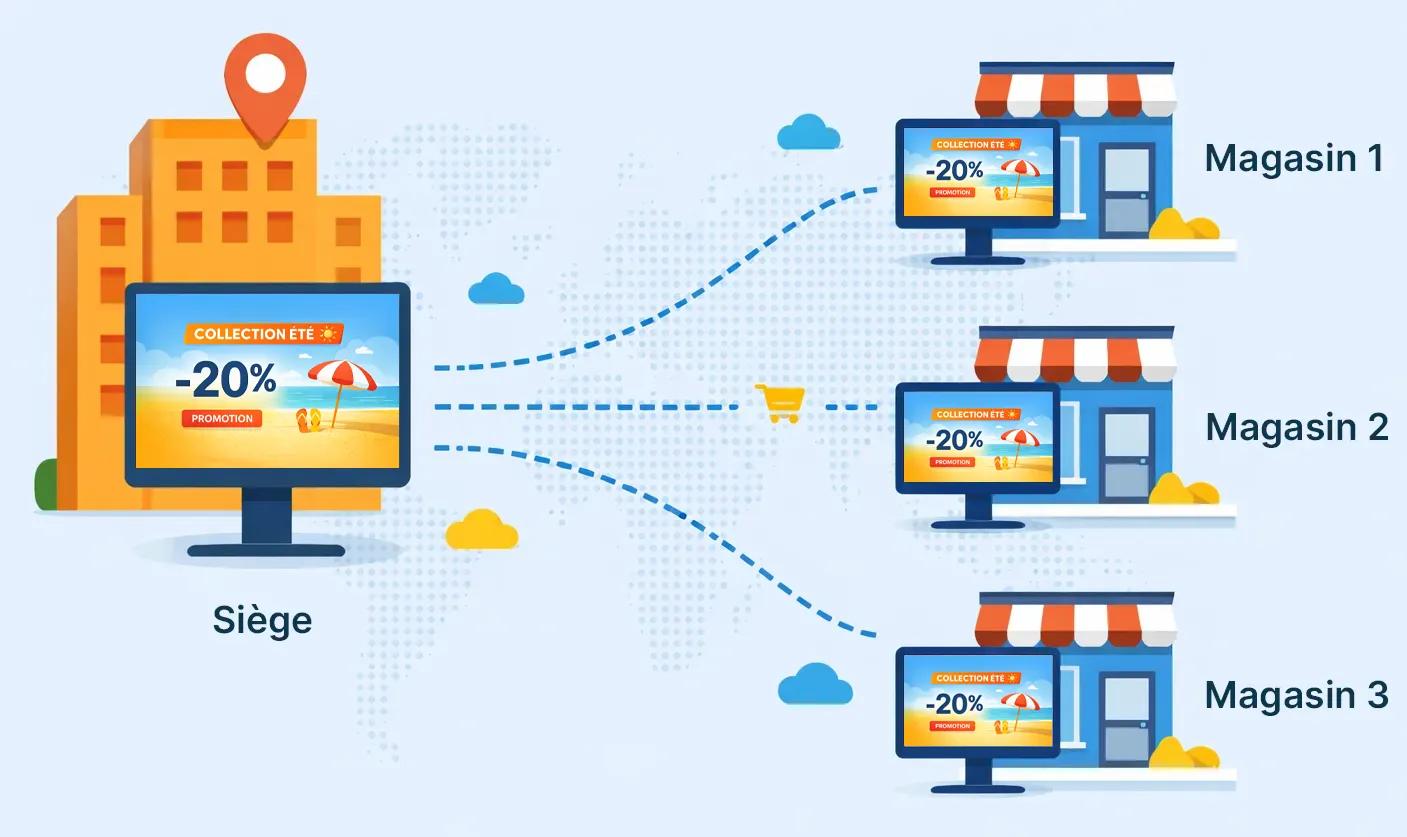
A shift in approach
Why digital signage automation is becoming essential
In stores, screens have become a communication channel in their own right. They can announce a commercial operation, guide customers, highlight a product range, remind visitors of a service, promote a local offer or pace content in a waiting area.
But the more screens become part of in-store communication, the more sensitive their management becomes. Content that is not updated, a campaign still running after its end date, an overly long playlist or a message that does not fit the zone can reduce the impact of the entire system.
Automation is therefore essential to move from occasional content display to active management. The goal is no longer simply to “put a video on a screen.” It is about organizing a reliable, consistent content flow that is easy to maintain over time.
More content
Commercial operations, key moments and network-wide messages are multiplying. Without a clear method, screens quickly become difficult to feed.
More display points
A network can have several screens per store, with different uses depending on the zone, audience or time of day.
Less time for store teams
Store teams cannot spend their time searching for, replacing, checking or restarting screen content.
In 2026, effective digital signage will therefore be less about equipment and more about organization. Retail brands already equipped with screens will need to make better use of them. Those rolling out new screens will need to think from the start about how content will be created, approved, scheduled and updated.
What gets in the way when digital signage is still managed manually
Manual management works as long as the volume of content remains low. One screen, a few visuals, an occasional operation: the setup can hold together with one-off sends and a few local adjustments.
But in a store network, limits appear quickly. Content circulates by email, files are not always the right ones, versions multiply, display dates are tracked in separate spreadsheets and no one always has a clear view of what is actually playing in-store.
As soon as a team has to manually check whether a screen is displaying the right content, at the right time, in the right store, it is a sign that the organization needs to be structured.
The most common symptoms
- National campaigns are not displayed consistently across all relevant stores.
- Local teams sometimes replace content with unapproved or outdated files.
- Screens keep displaying an operation long after it has ended.
- Playlists become overloaded, with no clear hierarchy between messages.
- Headquarters lacks visibility into what is actually displayed at the point of sale.
- Content is created in a rush, without an editorial logic adapted to screens.
These issues are not necessarily caused by a lack of willingness. They often come from a process that is too fragile. When display relies on repeated manual actions, scattered instructions and informal approvals, errors become almost inevitable.
Automating digital signage: where should you start?
Automation does not mean making everything complex. On the contrary, good automation should simplify daily work. It should avoid repetitive tasks, secure content and let teams focus on the message rather than on the mechanics of display.
For a retail brand, the first automation levers generally involve content preparation, campaign scheduling, store-by-store adaptation and playlist updates.
Automate scheduling
Define start and end dates in advance to avoid obsolete content and forgotten manual removals.
Automate adaptations
Adapt messages by store, zone, screen format or local operation, without starting from scratch every time.
Automate playlists
Organize content by priority, period, location or message type to avoid loops that are too long or inconsistent.
Automate updates
Replace approved content without placing unnecessary demands on stores, especially for network-wide campaigns or recurring key moments.
The right question is not: “What can we automate?” but rather: “Which tasks waste time, create errors or prevent content from being displayed properly?”
Operational method
A simple method to move toward managed signage
To automate digital signage without creating a heavy system, you need to start by clarifying the role of each screen. Not all screens in a network serve the same purpose. A window screen does not display the same messages as a checkout screen, reception screen, aisle screen or waiting area screen.
An effective method is to structure automation around four questions: what content, for which zone, at what time, and with what level of local autonomy?
- Map the screens. Identify locations, formats, uses and audiences exposed to each screen.
- Classify content. Separate national campaigns, local messages, permanent content, seasonal offers and service reminders.
- Define display rules. Specify dates, priorities, relevant zones and the conditions for replacing content.
- Frame store autonomy. Give field teams flexibility without losing graphic, commercial or editorial consistency.
- Review regularly. Make sure playlists remain clear, relevant and up to date as operations unfold.
This approach helps avoid a common trap: automating an already disorganized workflow. If content is not classified, if roles are unclear or if display rules change with every operation, automation will not solve everything. It may even make inconsistencies more visible.
Mistakes to avoid before automating your in-store screens
Automation can save a lot of time, but it requires a minimum amount of framing. The most common mistakes are not technical. They are mostly about organization, content and governance between headquarters and stores.
Automating without prioritizing messages
An automated playlist that is too crowded is still ineffective. Each piece of content needs a priority, a useful duration and a clear purpose.
Displaying the same content everywhere
A message that is relevant in a storefront is not necessarily relevant at checkout or in an aisle. Automation must account for display zones.
Forgetting end dates
The end of a display period is just as important as the launch. Outdated content on a screen quickly gives the impression of a lack of control.
Giving too much or too little autonomy
Field teams need to adapt certain messages, but within a reliable framework: approved templates, up-to-date content and clear rules.
The right balance is often found between centralized management and local adaptation. Headquarters ensures consistency, message compliance and campaign logic. Stores keep some flexibility for specific needs, local key moments or certain field priorities.
Content management
What Toucan® brings to digital signage automation
Toucan® helps retail brands organize their in-store communication with a more fluid approach: create materials, adapt visuals and display playlists on screens, without artificially separating print and digital needs.
For digital signage, the value lies in giving content a clear structure. Teams can prepare consistent visuals, adapt them as needed, then integrate them into playlists designed for in-store screens.
Create
Design visuals adapted to campaigns, store zones and available display formats.
Adapt
Adapt content by store, commercial operation or local communication need.
Display
Organize playlists and make it easier to display content on in-store screens.
This continuity matters for store networks. It avoids multiplying tools, files and approval workflows. It also helps better connect content creation with its real use in stores.
Automation does not remove the role of teams. It gives them a more reliable framework. Communication, marketing and network managers can manage campaigns more effectively. Stores can focus on showcasing operations rather than manually managing files.
In 2026, digital signage will need to be easier to manage
Digital signage has long been associated with visual impact. That is still true, but it is no longer enough. For a screen to be useful in-store, it needs to display relevant, readable, up-to-date content that fits the right context.
In 2026, the challenge will therefore be less about adding screens and more about using them better. Retail brands will need to reduce manual tasks, make display calendars more reliable, harmonize network-wide content and give stores simple tools to remain autonomous without going outside the framework.
Digital signage automation is becoming essential because it addresses this tension: moving faster while staying in control. That is what transforms a screen network into a true lever for in-store communication.
Move from manual digital signage to better-managed display
Toucan® supports retail brands in creating, adapting and displaying their in-store content, from printed materials to screen playlists. A simpler way to structure campaigns and strengthen consistency across the network.
Explore Toucan®FAQ - Digital Signage Automation
Digital signage automation means scheduling, organizing and displaying screen content with fewer manual steps. It helps better manage dates, playlists, display zones and updates.
Automating digital signage saves time, limits errors, keeps content up to date and ensures more consistent communication between headquarters and stores.
The content to automate first includes recurring campaigns, dated commercial operations, network-wide messages, multi-site playlists and content that needs to be replaced regularly.
No. Good automation frames store autonomy. It allows field teams to adapt certain content while respecting templates, brand rules and approved campaigns.
Yes. Toucan® allows teams to create content, adapt it based on needs and display playlists on in-store screens as part of a more structured communication approach.